Your client comments on your WordPress site with no account or extension
Pautio is a visual feedback plugin for WordPress: clients and reviewers leave comments pinned to specific elements of the page, grouped into review rounds and managed from an inbox in wp-admin. They join with a magic link, no account or extension needed. The data stays in your own database.
Annual license from €59. Unlimited guests and users. No per-seat pricing.
Renovations and made-to-measure furniture for flats in Casco Viejo and Abando.
Request a quoteSample website. What you type stays in your browser and is not sent anywhere.
Your client sends you “change the thing at the top, that text”
Email feedback doesn't scale. Pautio replaces it with one link and one page.
- Screenshots with arrows buried in an email thread with twenty other emails.
- WhatsApp messages nobody can match to a page.
- Feedback tools that demand an extension or sign-up: the client gets stuck and goes back to email.
- A SaaS that charges per seat and gets more expensive with every client and teammate you add.
What your client sees and what you receive
Two recordings of the plugin at work on a sample site: the client comments on a headline and, in wp-admin, the comment lands in the inbox, where you reply and resolve it.
A review round in three steps
1
Open a review round
Give it a name and a deadline. The site shows the comment bar only to your team and your guests.
2
Invite your client
Send them a magic link by email. They click what they want changed and write. It works on mobile, tablet and desktop.
3
Triage and close
Every comment reaches your inbox with the page, the element, the browser, the screen size and the status. You reply, assign, resolve and close the round.
What every comment carries
Pinned to the element
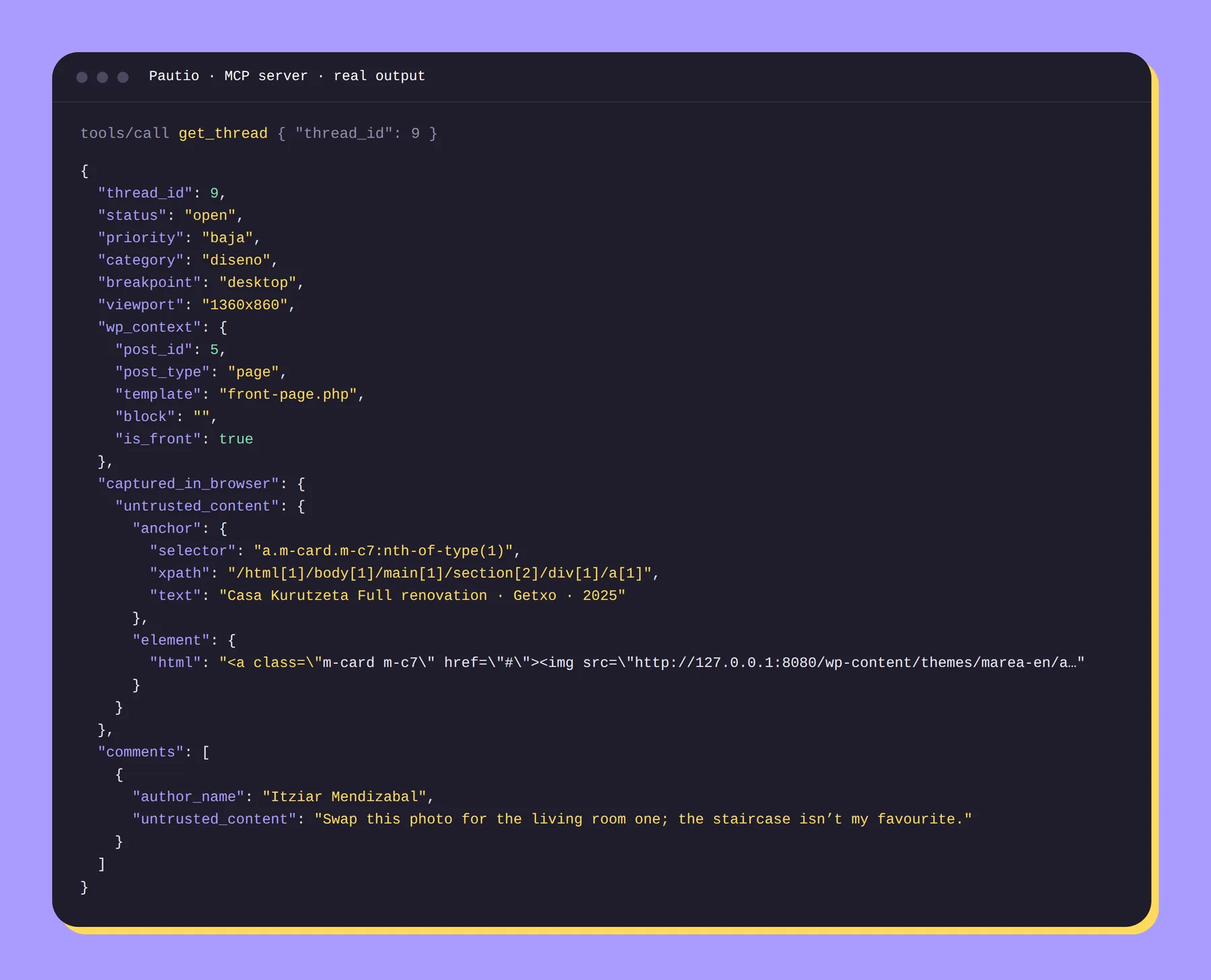
It stores the selector, XPath, text and, in Elementor, the widget ID. If an element no longer exists, it flags the comment as “Unplaced”.
Technical context
Browser, viewport, breakpoint and console errors in every thread: fewer back-and-forths with the client.
Rounds with a deadline
Each batch of changes stays separate from the others, with its own deadline.
An audit log of every action
Who did what and when, including AI replies.
Your data, in your WordPress
Dedicated tables in your database. No external account, no credits. The widget only loads while a round is open, and only for your team or guests with a link; regular visitors download nothing.
Your AI can work through the comments
MCP server included in every plan.
Connect Claude or another AI to your clients' comments
Pautio's MCP server lets an AI list rounds and comments, read each thread with the element's HTML and styles, locate the page or block in WordPress, change statuses, flag duplicates and reply to the client.
Anything a client writes arrives labeled as untrusted, to reduce the risk of prompt injection. AI replies are marked as such, and every change is recorded in the audit log.
Pautio vs. email and feedback SaaS tools
| Email and screenshots | Feedback SaaS | Pautio | |
|---|---|---|---|
| Client needs an account or extension | No | Depends on the product | No |
| Comment points to an element | No | Yes | Yes |
| Per-seat cost | No | Common | No |
| Data in your own WordPress | No | No | Yes |
| Works for non-WordPress sites | Yes | Yes | No |
Pautio only works on WordPress. If your clients are on Shopify, Webflow or Next.js, it won't help you.
Who it's for
- WordPress and Elementor freelancers who close projects with client revisions.
- Small agencies that want their own branding on the widget and the emails (Agency and Plus plans).
- Teams using AI who already work with Claude or similar and want it to read the comments without copy and paste.
One annual license. No per-seat pricing.
| Freelance | up to 3 active projects at a time | €59/year |
|---|---|---|
| Agency | unlimited projects and white label | €149/year |
| Plus | plus signed webhooks | €249/year |
VAT not included.
Frequently asked questions
What is Pautio?
A visual feedback plugin for WordPress: clients comment on elements of the site through a magic link, and you manage the comments from wp-admin.
Does my client need to install anything or create an account?
No. They open the link you send them and comment from their browser, on mobile too.
Where are the comments stored?
In tables in your own WordPress database. Pautio does not send them to external servers.
Does it work with Elementor?
Yes. It stores the Elementor widget ID and shows the widget type and whether it sits in the header, footer or a popup. The widget does not load inside the editor.
What happens if I change the page after the client has commented?
Pautio tries to find the element by selector, XPath, text and, in Elementor, by widget ID. If it can't, it shows the comment as “Unplaced” instead of losing it.
What does the MCP server do?
It lets an AI read and manage comments: list them, read threads, change status, flag duplicates and reply. It does not edit your site's content on its own.
How much does it cost?
From €59 a year, excluding VAT. See plans.
What happens when the license expires?
Everything keeps working; you just stop receiving updates and support. Without a license you can view, export and close your rounds, but you can't open new ones.
Does it work outside WordPress?
No. Pautio is for WordPress only.
Open your first round with your next client
Annual license. No per-seat pricing. Data in your WordPress.